
Computational Fluid Dynamics (CFD) software has become an essential technology for engineers, designers, researchers, and manufacturers who need to understand how fluids and gases behave in real-world conditions. From designing aircraft and automobiles to improving industrial equipment and analyzing airflow in buildings, CFD software allows professionals to simulate fluid behavior without relying entirely on expensive physical prototypes.
CFD stands for Computational Fluid Dynamics, a branch of engineering that uses numerical methods and computer simulations to analyze the movement of fluids, heat transfer, pressure, turbulence, and other physical phenomena. Instead of building a physical model and testing it repeatedly, engineers can create a digital representation of a system and evaluate its performance under different conditions.
As computing power has increased, CFD software has become more accessible and capable. Modern platforms can handle increasingly complex geometries, advanced physics, transient simulations, multiphase flows, and even coupled problems involving fluid flow, heat transfer, structural mechanics, and chemical reactions.
What Is CFD Software?
CFD software is a computer-based engineering tool used to simulate and analyze the behavior of fluids such as air, water, oil, fuel, refrigerants, and gases.
The software uses mathematical equations that describe fluid motion and solves those equations numerically. The most common equations involved are the Navier-Stokes equations, which describe the conservation of mass, momentum, and energy in fluid flows.
A typical CFD analysis begins with a digital model of the object or environment being studied. The software then divides the computational domain into many small elements or cells. This process is known as meshing. The governing equations are solved across these cells to predict how the fluid behaves throughout the system.
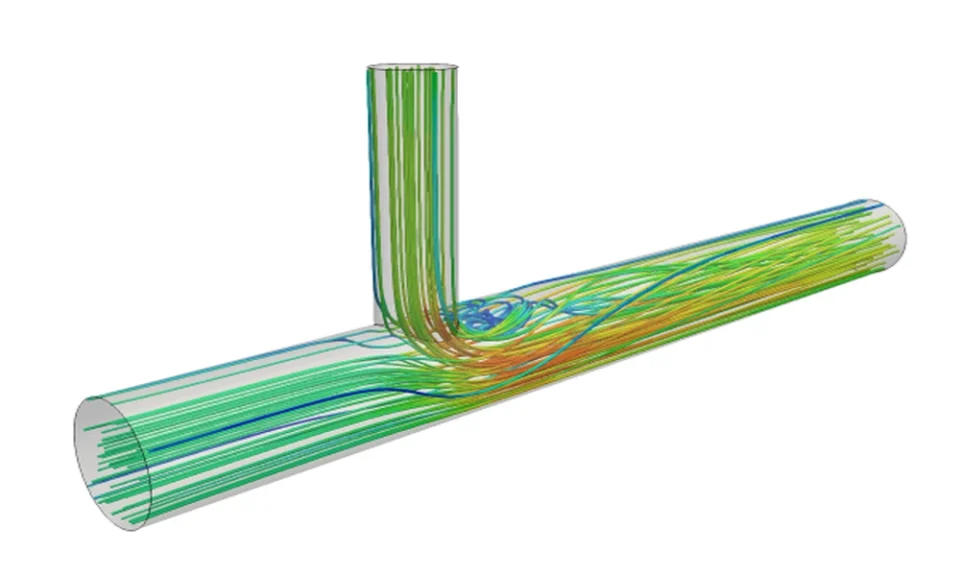
The resulting data can be displayed through color maps, vectors, streamlines, graphs, animations, and other visualizations. Engineers can then examine variables such as velocity, pressure, temperature, density, turbulence, and heat transfer.
How Does CFD Software Work?
Although individual CFD programs have different interfaces and capabilities, most CFD workflows follow several fundamental stages.
1. Geometry Creation
The first step is defining the physical object or environment being analyzed. This could be an aircraft wing, car body, pipe, pump, turbine, heat exchanger, building, or electronic enclosure.
Geometry may be created directly within the CFD software or imported from CAD software. The quality of the geometry is important because unnecessary gaps, tiny features, and complicated surfaces can make the simulation more difficult and computationally expensive.
2. Meshing
Once the geometry is prepared, the computational domain is divided into smaller sections called cells or elements. This is known as mesh generation.
A finer mesh can capture small flow features more accurately, but it also requires more computing resources. Engineers therefore need to balance accuracy and computational cost.
Mesh refinement is particularly important around areas where fluid behavior changes rapidly, such as sharp edges, walls, narrow passages, and regions with significant turbulence.
3. Setting Boundary Conditions
The next step is defining how the system behaves at its boundaries.
For example, an engineer analyzing airflow through a ventilation duct may specify the air inlet velocity, outlet pressure, wall conditions, and air temperature. In an automotive simulation, the engineer might define vehicle speed, ambient temperature, air density, and road-related conditions.
Accurate boundary conditions are critical because the simulation can only be as reliable as the assumptions and inputs used to create it.
4. Solving the Equations
The CFD solver processes the mathematical equations governing the fluid flow. Depending on the problem, the simulation may be steady-state or transient.
A steady-state simulation assumes that conditions do not change significantly with time. A transient simulation, on the other hand, calculates how the flow develops over time.
Complex simulations can require substantial computing power and may take minutes, hours, or even days to complete.
5. Post-Processing
After the solver completes the calculations, engineers analyze the results using visualization and data-analysis tools.
For example, a CFD simulation may show that a particular component experiences excessive pressure loss or that an area of an enclosure has inadequate cooling. Engineers can then modify the design and run another simulation.
This iterative process is one of the major advantages of CFD.
Why Do Engineers Use CFD Software?
One of the biggest benefits of CFD software is that it can reduce the need for expensive physical testing.
Physical prototypes can require significant amounts of time and money. A manufacturer may need to build multiple versions of a product before identifying the best design. CFD allows engineers to evaluate many concepts digitally before committing to manufacturing.
CFD can also provide detailed information that is difficult to obtain through physical experiments. A simulation can provide information about pressure, velocity, temperature, and flow patterns throughout an entire computational domain.
Other important benefits include:
- Reduced development costs
- Faster design iteration
- Improved product performance
- Better understanding of fluid behavior
- Reduced dependence on physical prototypes
- Ability to test extreme or difficult conditions
- Improved energy efficiency
- Support for design optimization
However, CFD should not automatically be viewed as a replacement for physical testing. Experimental validation remains important, particularly for safety-critical applications.
Common Applications of CFD Software
CFD software is used across many industries.
Automotive Engineering
Automotive manufacturers use CFD to study airflow around vehicles, cooling systems, engine components, and braking systems.
Aerodynamic simulations can help engineers reduce drag and improve fuel efficiency or electric-vehicle range. CFD can also be used to examine cooling airflow around batteries, motors, radiators, and other components.
Aerospace
The aerospace industry is one of the major users of CFD technology. Engineers use simulations to study airflow around aircraft wings, fuselages, engines, and other components.
CFD can help evaluate lift, drag, pressure distribution, turbulence, and thermal behavior. It can also contribute to the development of spacecraft and propulsion systems.
Energy
CFD plays an important role in power generation and energy systems. Engineers can analyze airflow and heat transfer in turbines, boilers, heat exchangers, cooling systems, and renewable-energy equipment.
For example, CFD can be used to study airflow through wind turbines and optimize blade designs for different operating conditions.
HVAC and Building Design
Heating, ventilation, and air-conditioning engineers use CFD to understand airflow and temperature distribution inside buildings.
A simulation can identify areas with poor ventilation, excessive heat, or uncomfortable temperature differences. This can help engineers design more effective ventilation systems while potentially reducing energy consumption.
Manufacturing
Manufacturing companies use CFD to study processes involving fluids, gases, cooling, heating, and chemical reactions.
Applications can include casting, injection molding, welding, spray systems, furnaces, and industrial ventilation.
Electronics Cooling
As electronic devices become increasingly powerful and compact, thermal management has become a major engineering challenge.
CFD software can simulate airflow and heat transfer inside computers, servers, telecommunications equipment, and other electronic systems. Engineers can use the results to determine whether fans, heat sinks, vents, or other cooling solutions are sufficient.
Types of CFD Software
There is no single CFD program that is ideal for every application. Different tools are designed for different levels of complexity, industries, and workflows.
Some CFD platforms are commercial products that provide comprehensive graphical interfaces, automated meshing, advanced solvers, and technical support. Others are open-source solutions that provide considerable flexibility for users who have the technical knowledge to configure and customize simulations.
CFD software can also differ based on the physics it supports. Some programs specialize in general fluid flow, while others are particularly strong in areas such as combustion, multiphase flow, turbomachinery, external aerodynamics, or heat transfer.
When choosing CFD software, organizations should consider the type of simulations they need, available computing resources, user expertise, compatibility with existing CAD systems, licensing costs, and technical support.
What Makes Good CFD Software?
A good CFD platform should provide a combination of accurate physics, reliable numerical methods, efficient computing, and practical usability.
One important consideration is the solver. The solver determines how the governing equations are calculated and what physical models are available.
Another consideration is meshing capability. Automatic and adaptive meshing tools can save significant time, particularly when working with complicated geometries.
Post-processing is equally important. Engineers need to be able to interpret large amounts of simulation data efficiently. Clear visualization tools, customizable plots, animations, and reporting capabilities can make the difference between a useful simulation and an overwhelming collection of numbers.
Integration with CAD and other engineering software is also valuable. A streamlined workflow allows engineers to modify a design, update the simulation, and compare results without repeatedly rebuilding models from scratch.
Limitations of CFD Software
Despite its advantages, CFD has limitations.
A simulation is a mathematical approximation of reality. Its accuracy depends on the quality of the geometry, mesh, boundary conditions, physical models, numerical methods, and input data.
Turbulent flows, multiphase systems, combustion, and highly transient phenomena can be particularly challenging to model accurately.
CFD can also require substantial computing resources. Increasing the mesh resolution or adding more complex physical models can dramatically increase simulation time.
Another potential issue is incorrect interpretation. A visually impressive simulation does not necessarily mean the underlying results are accurate. Engineers must understand numerical convergence, mesh independence, model assumptions, and validation techniques.
For this reason, CFD should be treated as an engineering analysis method rather than a simple visualization tool.
The Future of CFD Software
CFD technology continues to evolve alongside advances in computer hardware, cloud computing, automation, and artificial intelligence.
Cloud-based CFD platforms are making high-performance computing more accessible by allowing organizations to run large simulations without maintaining all of the necessary computing infrastructure themselves.
Automation is also becoming increasingly important. Modern software can automate portions of geometry preparation, meshing, parameter studies, optimization, and post-processing.
Artificial intelligence and machine learning may further change CFD workflows. AI-based techniques can help identify patterns in simulation results, create surrogate models, accelerate optimization, and potentially reduce the number of expensive simulations required for certain engineering tasks.
These developments could make CFD faster and more accessible while allowing engineers to investigate increasingly complex systems.
Choosing the Right CFD Software
Choosing CFD software should begin with the engineering problem rather than the software brand.
Organizations should first identify the types of fluids, geometries, physics, and operating conditions they need to simulate. They should then evaluate whether potential software options support those requirements.
Budget is another consideration. Commercial CFD platforms may involve licensing and maintenance costs, while open-source alternatives can reduce licensing expenses but may require greater technical expertise.
The experience of the engineering team should also influence the decision. A highly sophisticated CFD package may provide extensive capabilities, but those capabilities are only valuable if users can apply them correctly.
Trial versions, demonstrations, training resources, documentation, and technical support can all help organizations evaluate whether a particular platform is suitable for their workflow.
Conclusion
CFD software has transformed the way engineers study fluid behavior and develop products. By allowing users to simulate airflow, liquid flow, heat transfer, pressure, turbulence, and other physical phenomena, CFD provides valuable insights before a physical prototype is manufactured or tested.
Its applications extend across automotive, aerospace, energy, manufacturing, HVAC, electronics, and many other industries. While CFD can significantly reduce development time and costs, it is not a substitute for engineering judgment or experimental validation.
The most effective CFD workflows combine reliable software, appropriate physical models, high-quality meshes, accurate boundary conditions, sufficient computing resources, and experienced engineers who understand how to interpret the results.
As automation, cloud computing, and artificial intelligence continue to develop, CFD software is likely to become even more powerful and accessible. For organizations looking to improve product performance, reduce development costs, and make better engineering decisions, computational fluid dynamics remains one of the most valuable digital engineering technologies available.
